
.png)
.jpg)
Description
Download TypeRacer – Free Online Typing Game to Boost Speed & Accuracy
Overview
In today’s digital world, typing is as essential as reading and writing. Whether you’re a student, a professional, or simply someone who spends a lot of time in front of a keyboard, improving your typing speed and accuracy can save you minutes—or even hours—each day. TypeRacer transforms the often‑tedious practice of typing into an exhilarating race against real people from around the globe. Instead of steering a car on a traditional track, you propel a virtual vehicle forward by typing quotes from movies, books, songs, and even user‑generated text. The faster and more accurately you type, the quicker your car reaches the finish line. This competitive twist makes learning feel like play, encouraging repeat sessions without the boredom that typical typing tutors can bring.
TypeRacer offers two distinct play modes. As a guest, you can jump straight into random races, testing your current skill level without committing to an account. If you prefer tracking progress, creating a free account unlocks detailed statistics such as words‑per‑minute (WPM), error rate, total races completed, and personal ranking among millions of typists. The platform’s strict error handling ensures that each keystroke matters—mistyped words force you to backtrack, reinforcing muscle memory and improving precision. Over time, users report an average improvement of 50 WPM, a testament to the game’s effectiveness as both an educational tool and a fun pastime.
Because the game runs directly in modern browsers, there’s no need for bulky installations or hefty system requirements. Whether you’re on Windows, macOS, Linux, Android, or iOS, a stable internet connection and an up‑to‑date browser are enough to start racing. The interface is clean, responsive, and accessible, with customizable themes and the ability to invite friends for private match‑ups. In short, TypeRacer blends the competitive spirit of online gaming with the practical benefits of typing practice, making it a standout option for anyone looking to sharpen their keyboard skills while having a blast.
Key Features of TypeRacer
- Real‑time Multiplayer Races: Compete against strangers or friends in live races, seeing each participant’s car advance as they type.
- Extensive Quote Library: Over 10,000 quotes sourced from movies, literature, songs, and user‑submitted content keep the text fresh and challenging.
- Detailed Performance Metrics: Track WPM, accuracy, race history, best times, and percentile rankings on a personal dashboard.
- Guest Mode & Account Option: Play instantly without an account or sign up for free to unlock progress tracking and leaderboards.
- Customizable Themes & Accessibility: Switch between light/dark modes, adjust font size, and enable high‑contrast settings for comfortable long‑play sessions.
- Invite‑Only Private Races: Generate a unique link to challenge friends, family, or coworkers, ideal for team‑building or classroom activities.
- Cross‑Platform Compatibility: Runs in any modern browser on Windows, macOS, Linux, Android, and iOS without additional downloads.
- Responsive Design: Optimized for desktop monitors, tablets, and smartphones, ensuring a smooth experience on any device.
- Error‑Focused Gameplay: The car halts on every mistake, compelling you to correct errors before moving forward, which reinforces accuracy.
- Free to Play with Optional Donations: The core experience is completely free; users can support development via voluntary contributions.
Installation & Usage Instructions
Getting started with TypeRacer is intentionally straightforward. Because the game is web‑based, there is no traditional “installation” process. Follow these steps to begin racing:
- Choose a Supported Browser: Use the latest version of Chrome, Firefox, Edge, Safari, or any Chromium‑based browser. Older browsers may experience rendering issues.
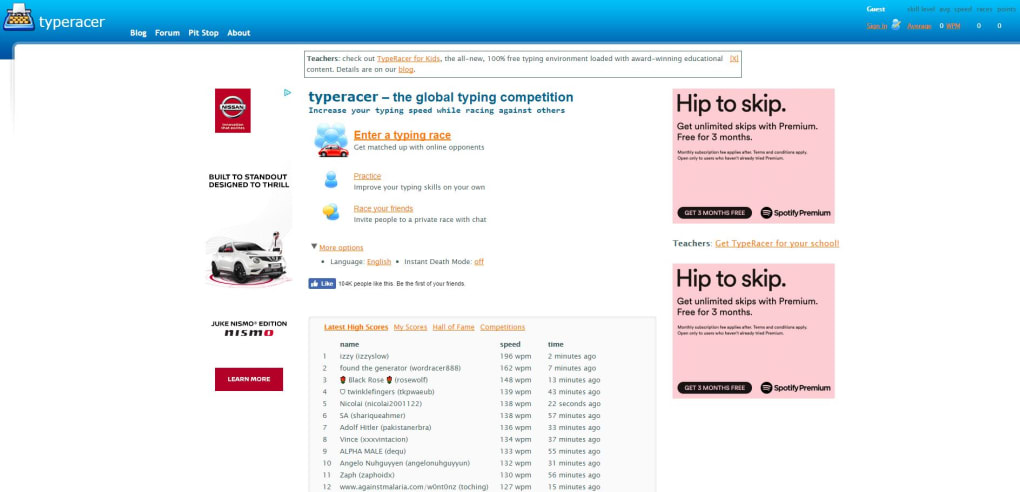
- Visit the Official Site: Navigate to play.typeracer.com. The homepage displays a quick “Start Racing” button and options for login or guest play.
- Play as a Guest (Optional): Click “Play as Guest” to join a random race instantly. No personal data is stored, and you’ll see a simple dashboard with your current race stats.
- Create an Account (Recommended): Click “Sign Up,” enter a valid email address, choose a username, and set a secure password. After verification, you’ll gain access to your personal profile, race history, and leaderboards.
- Select a Race Type: Choose between “Standard Race,” “Private Race,” or “Practice Mode.” Standard races match you with players of similar skill; private races let you share a link with friends; practice mode offers solo typing without competition.
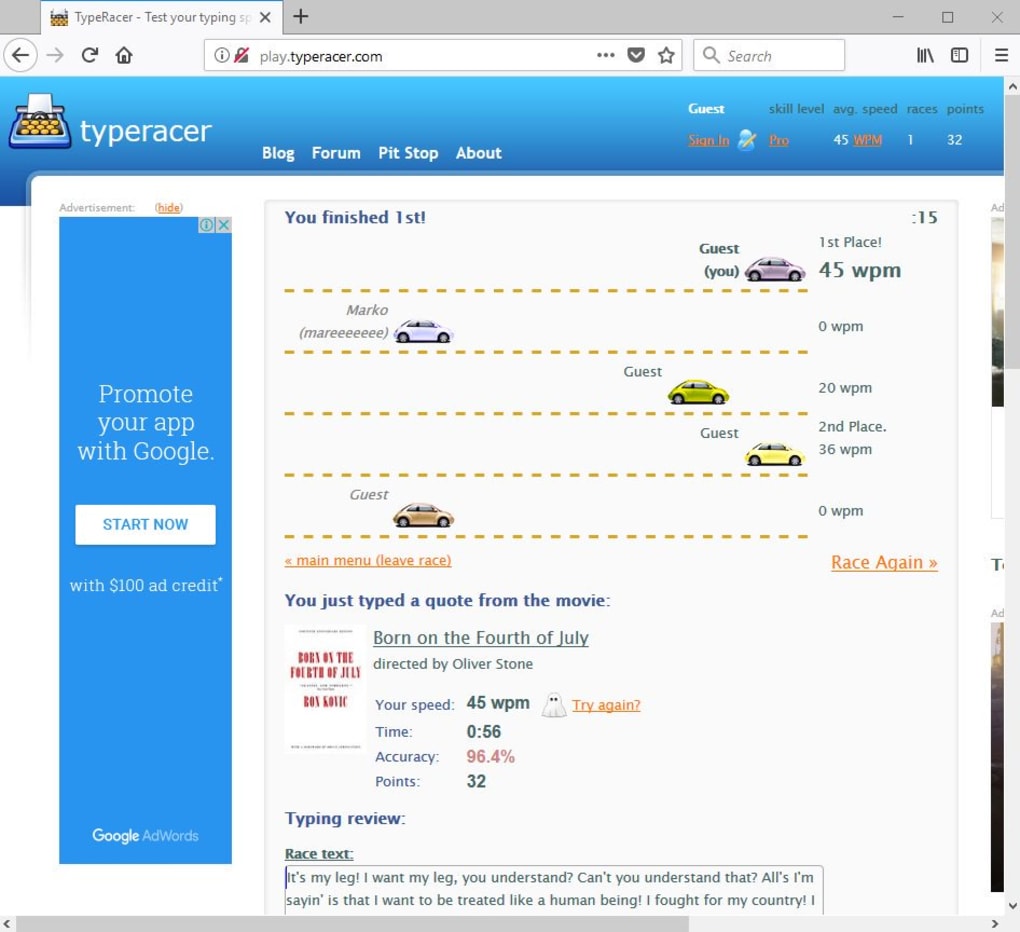
- Start Typing: Once the race begins, a line of text appears beneath the racetrack. As you type each character correctly, your car advances. Mistakes cause the car to stop, and you must correct the error before continuing.
- Review Your Results: After each race, a summary screen displays your WPM, accuracy, rank, and any personal bests. Registered users can view long‑term trends on their profile page.
- Customize Settings (Optional): Access the “Settings” menu to toggle dark mode, adjust text size, enable sound effects, or set a preferred language for the quotes.
For mobile users, the experience is identical—simply tap the site’s URL in your device’s browser. The responsive layout ensures the racetrack and typing field scale appropriately, making it comfortable to race on a touchscreen keyboard. If you encounter any connectivity issues, clearing your browser cache or switching to a wired network can improve latency, which is crucial for real‑time multiplayer races.
Compatibility and System Requirements
TypeRacer is built with modern web technologies (HTML5, CSS3, JavaScript) and therefore runs on any operating system that supports a contemporary browser. Below is a breakdown of the officially supported platforms:
- Windows: Windows 10, Windows 11, and Windows 8.1 (64‑bit or 32‑bit) with Chrome, Edge, Firefox, or Safari.
- macOS: macOS 10.15 Catalina and later, using Safari, Chrome, or Firefox.
- Linux: Major distributions (Ubuntu, Fedora, Debian, etc.) with any up‑to‑date Chromium‑based browser.
- Android: Android 8.0 Oreo and newer, using Chrome or Firefox mobile.
- iOS / iPadOS: iOS 13+ and iPadOS 13+ with Safari or Chrome.
Because the game is hosted in the cloud, there are no heavy CPU or GPU demands. A stable internet connection (minimum 3 Mbps) is recommended for smooth real‑time gameplay, especially in competitive multiplayer races where latency can affect car movement. The game does not require any additional plugins, Flash, or Java, which further simplifies compatibility.
For users with accessibility needs, TypeRacer supports screen‑reader compatible HTML markup and offers high‑contrast themes. Keyboard‑only navigation is possible, allowing users who cannot use a mouse to still join races and view results. Overall, the low barrier to entry makes TypeRacer a universally accessible tool for typing improvement.
Pros, Cons, Frequently Asked Questions & Final Thoughts
Pros
- Free to play with optional donation support.
- Real‑time multiplayer races create a motivating competitive environment.
- Extensive quote library keeps content fresh and varied.
- Detailed performance analytics help users track progress over time.
- Cross‑platform, browser‑based design eliminates installation hassles.
- Responsive UI works on desktops, tablets, and smartphones.
- Customizable themes and accessibility options cater to diverse user needs.
Cons
- Requires a constant internet connection; offline practice is not available.
- Occasional matchmaking delays during peak traffic hours.
- No built‑in typing lessons for absolute beginners; relies on self‑guided practice.
- Limited language support; most quotes are in English.
- Ads may appear on the free version for non‑registered users.
Frequently Asked Questions
Is TypeRacer completely free?
Yes, the core game is free. Users can play as guests or register without any cost. Optional donations are accepted to support development, but no features are locked behind a paywall.
Can I use TypeRacer on a mobile device?
Absolutely. The site is fully responsive and works on Android and iOS browsers. The typing interface adapts to touchscreen keyboards, making it easy to race on the go.
How does TypeRacer track my typing speed?
The platform calculates words‑per‑minute (WPM) based on the number of correctly typed characters divided by the time taken. Accuracy is also measured, and both metrics are displayed after each race.
Is there a way to practice without competing?
Yes. The “Practice Mode” lets you type quotes without opponents, focusing solely on speed and accuracy. Your results are still recorded if you’re logged in.
Can I create private races for my classroom or team?
Definitely. By generating a private race link, you can invite specific participants. This feature is popular among educators and corporate trainers for typing drills and team‑building exercises.
Conclusion – Take the Keyboard for a Spin!
If you’re searching for an engaging, no‑cost solution to boost your typing speed while having fun, TypeRacer delivers exactly that. Its multiplayer race format transforms ordinary practice into an adrenaline‑pumping competition, and the built‑in analytics give you concrete evidence of improvement. Because it runs in any modern browser, you can jump in from virtually any device without worrying about compatibility or installation headaches. While the lack of offline mode and limited language options might be drawbacks for a few users, the overall experience remains compelling for both beginners and seasoned typists.
Ready to put your fingers to the test? Download TypeRacer now, create an account, and start racing against millions of typists worldwide. Watch your WPM climb, your error rate shrink, and most importantly, enjoy the thrill of watching your virtual car speed across the finish line—all thanks to the power of your keyboard.
TypeRacer combines competitive gaming with practical skill development. Its free, cross‑platform nature makes it accessible to anyone with an internet connection, and the detailed stats keep users motivated. Minor issues like occasional matchmaking delays and ad presence for guests keep the rating from a perfect score, but overall it remains one of the best typing improvement tools available today.
Guides & Tutorials for TypeRacer
How to install TypeRacer
- Click the Preview / Download button above.
- Once redirected, accept the terms and click Install.
- Wait for the TypeRacer download to finish on your device.
How to use TypeRacer
This software is primarily used for its core features described above. Open the app after installation to explore its capabilities.
User Reviews for TypeRacer 0
No reviews found




